 Agent Standup
Codex notifications: know when Codex is done or needs you
Codex can work for minutes on one task. You switch to another window, and then you either check back too often or come back long after it stopped to ask you something. Codex has two settings for this, and they cover different cases. This page shows both, with a script you can copy, and a way to watch every Codex session at once without setting anything up.
1. The built-in terminal notifications
The Codex CLI can notify you itself, from the terminal it runs in. In ~/.codex/config.toml:
[tui]
notifications = true
Three keys control it, from the official configuration reference (https://developers.openai.com/codex/config-reference):
tui.notifications:trueto turn them on, or a list to keep only some events, for example["agent-turn-complete", "approval-requested"]: the end of a turn, and a command waiting for your approval.tui.notification_method:auto(the default),osc9orbel. Inauto, Codex sends an OSC 9 sequence when your terminal seems to support it, which some terminals show as a desktop notification, and otherwise rings the terminal bell.tui.notification_condition:unfocused(the default: only when the terminal is not in front) oralways.
If nothing shows up, your terminal probably treats OSC 9 as nothing, or the bell as silent: try notification_method = "bel" and turn on your terminal's bell or "visual bell" setting.
2. Your own program, with notify
For a real desktop notification in any terminal, a sound, or a message to your phone or a chat, Codex can run a program of yours. In the user-level ~/.codex/config.toml (Codex ignores notify in a project's own .codex/config.toml):
notify = ["python3", "/Users/you/.codex/notify.py"]Codex runs it with one argument: a JSON object with type, thread-id, turn-id, cwd, input-messages and last-assistant-message (https://developers.openai.com/codex/config-advanced). Today notify only fires on agent-turn-complete, the end of a turn, not when a command waits for your approval: use tui.notifications above for that.
A small script for macOS and Linux, with nothing to install on a Mac (it uses osascript; on Linux, notify-send):
#!/usr/bin/env python3
import json, platform, subprocess, sys

event = json.loads(sys.argv[1])
if event.get("type") != "agent-turn-complete":
    sys.exit(0)
title = "Codex is done"
text = (event.get("last-assistant-message") or "Turn complete")[:180]

if platform.system() == "Darwin":
    subprocess.run(["osascript", "-e", "on run argv",
                    "-e", "display notification (item 1 of argv) with title (item 2 of argv)",
                    "-e", "end run", text, title])
else:
    subprocess.run(["notify-send", title, text])
On macOS, the notification comes from "Script Editor" the first time: allow it in System Settings → Notifications if it does not appear. The official page has the same idea with terminal-notifier, in Python, TypeScript, Go and more.
3. Every Codex session at once, with no setup
Notifications tell you about one session at a time. If you run several Codex sessions, or Codex next to Claude Code, Agent Standup shows them all together as a live team call: who is working (and on what command), whose turn is over, and the real output of what each agent ran.
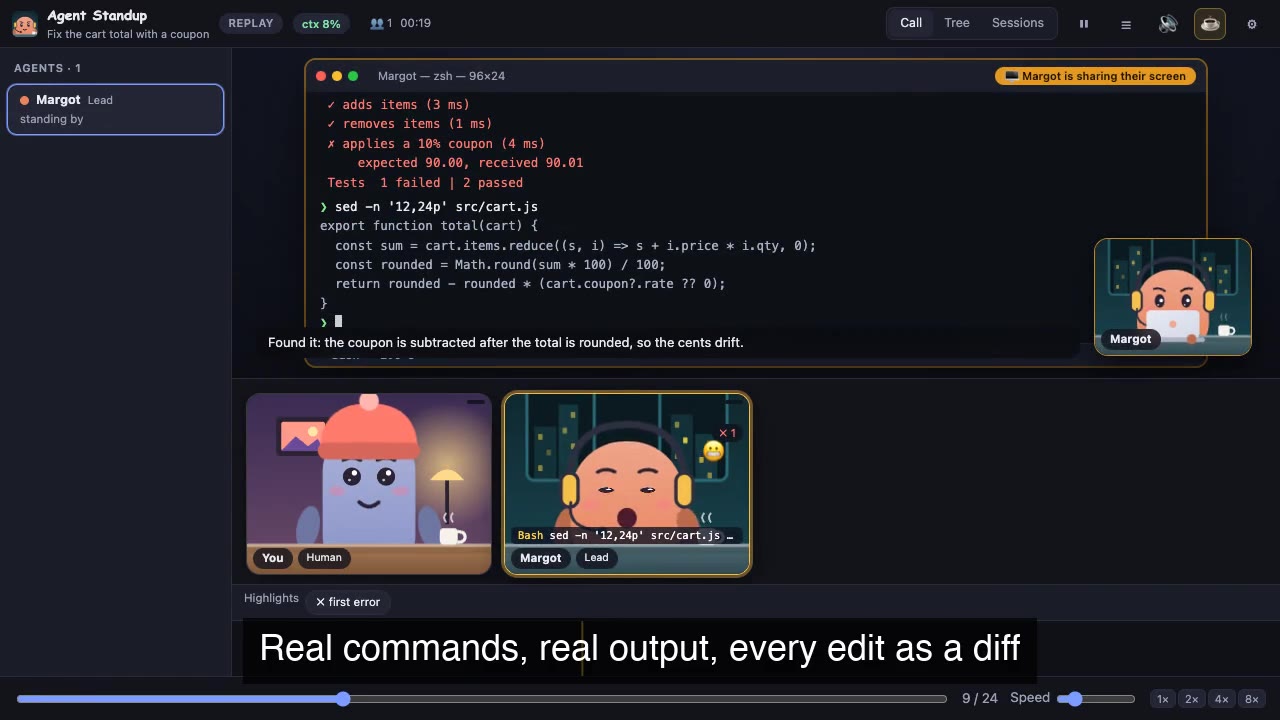
- Nothing to configure. It reads the files Codex already writes in
~/.codex/sessions(CLI and desktop app, compressed sessions included) and never writes there. No hooks, noconfig.tomlchange, zero tokens. - A board of every session, sorted by what is waiting on you first, across Codex, Claude Code and Mistral Vibe.
- In VS Code, live counts in the status bar for the folder you have open, and a soft chime when the team has worked for a while and gone quiet.
- Honest limit: a Codex command waiting for your approval does not show as "needs you" yet (it does for Claude Code and Mistral Vibe sessions). Keep
tui.notificationson for approvals.
Try it
- In VS Code or Cursor: search "Agent Standup" in the Extensions view, then open the call from the Activity Bar.
- In a terminal, without installing anything (Node 18 or later; Node 22.15+ to read Codex's compressed sessions):
npx @double_geste/agent-standup@latest --open. - As a desktop app for macOS, Windows and Linux, from https://agent-standup.com
Questions
Do I need both settings? tui.notifications is enough if you work in a terminal that shows OSC 9 notifications. Add notify for anything else: a sound, your phone, a chat channel, or a notification that does not depend on the terminal.
Why does nothing happen when the terminal is in front? tui.notification_condition defaults to unfocused. Set it to "always" to be notified even then.
Does Agent Standup send my sessions anywhere? No. It reads them on your computer and shows them there. See the privacy page: https://agent-standup.com/privacy/